
Download Meta AI Studio – Free AI Character Creator, Secure Tool
Introduction
In today’s hyper‑connected world, conversational agents have moved from experimental labs to everyday marketing, support, and entertainment tools. Yet many creators still face a steep learning curve when trying to build an AI personality that feels authentic, scalable, and compliant with privacy standards. Meta AI Studio steps in as a cloud‑first solution that removes technical barriers while delivering a rich set of features for both beginners and seasoned developers. Built on Meta’s proprietary language models, the platform lets you design AI characters that can chat on Instagram, Messenger, WhatsApp, and other popular channels—all without writing a single line of code.
The service is positioned as a free, secure, and constantly updated tool that adapts to the evolving needs of creators, small businesses, and educators. Whether you aim to automate routine customer queries, amplify your personal brand with a digital twin, or experiment with multilingual chatbots, Meta AI Studio offers a streamlined workflow that starts with a simple sign‑up and ends with a live AI persona ready to engage your audience. This review walks through the core capabilities, the step‑by‑step setup process, the platforms it supports, and the pros and cons you should weigh before committing to the free tier or a paid plan.
By the end of this article you’ll have a clear picture of how Meta AI Studio fits into a broader AI strategy, what you can realistically achieve without a developer background, and why the platform’s security and compliance posture makes it a trustworthy option for creators handling sensitive data. Let’s dive into the details.
Overview and Key Features
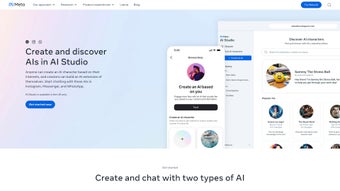
Meta AI Studio is a web‑based application that empowers users to craft personalized AI characters through an intuitive visual interface. The platform categorises AI personas into two main types: Creator AI, which mirrors a specific individual’s tone and style, and AI Characters, which serve as versatile conversational agents for various use cases. Both types leverage Meta’s large‑scale language models to deliver natural, context‑aware dialogues.
The platform is hosted entirely in the cloud, eliminating the need for local installations or powerful hardware. All you need is a modern browser and an internet connection. Security is baked in: every data exchange is protected by TLS 1.3, and the service complies with GDPR and CCPA, ensuring that creators retain full ownership of their content.
- Dual‑Mode AI Creation: Build Creator AI or generic AI Characters from a single dashboard.
- Cross‑Platform Deployment: One‑click publishing to Instagram, Messenger, and WhatsApp.
- Visual Personality Builder: Drag‑and‑drop avatars, select voice tones, and customize behavioral scripts.
- AI Studio Handbook: In‑depth tutorials, video guides, and best‑practice articles.
- Real‑Time Testing Console: Sandbox environment for live interaction testing.
- Analytics Dashboard: Track conversation length, sentiment, and retention metrics.
- Secure Cloud Hosting: End‑to‑end encryption and no local processing required.
- Multi‑Language Support: Over 30 languages for global reach.
- Automatic Model Updates: Continuous improvements without manual intervention.
- Community Marketplace: Share or purchase ready‑made AI character templates.
Each feature is crafted to keep the user experience frictionless. The visual editor guides you through personality definition, while the analytics suite provides actionable insights that help refine the AI’s responses over time. Even with zero coding knowledge, you can launch a functional AI in under an hour, making Meta AI Studio a compelling entry point for anyone interested in conversational AI.
Installation, Compatibility & Usage Instructions
Zero‑Installation Cloud Access
Meta AI Studio runs entirely in the browser, so there’s no traditional download or installation step. Navigate to studio.meta.com using any up‑to‑date browser (Chrome, Edge, Safari, or Firefox). The platform automatically adapts to desktops, laptops, tablets, and smartphones, delivering a responsive interface that works on Windows 10/11, macOS 12+, Linux, iOS 13+, and Android 9+.
Because the heavy lifting happens on Meta’s secure servers, the client device only needs a stable internet connection and TLS 1.3 support. No GPU or CPU requirements are imposed, making it accessible even on low‑end hardware.
Step‑by‑Step Setup
- Account Creation: Click “Sign Up,” register with an email address or link a Meta social account, and confirm via email.
- Select Project Type: Choose “Creator AI” for a brand‑centric twin or “AI Character” for a generic chatbot.
- Define Personality: Fill out the questionnaire to set tone, interests, and target audience; the platform converts this into a model prompt.
- Customize Appearance: Pick an avatar from the library or upload your own image; optionally set voice parameters for audio responses.
- Channel Integration: In the “Deploy” tab, select Instagram, Messenger, or WhatsApp and follow the provided webhook instructions.
- Sandbox Testing: Use the real‑time console to simulate conversations, tweaking prompts until responses feel natural.
- Publish: Hit “Publish” to make the AI live; monitor interactions via the analytics dashboard.
Maintenance, Updates & Troubleshooting
Model upgrades are automatic. When a new version is released, a banner appears with a one‑click “Upgrade” button. Existing characters retain their configurations, and you can enable new capabilities such as enhanced memory with minimal effort. Routine maintenance includes password updates and optional two‑factor authentication for added security.
Common issues are easily resolved: clear browser cache for UI glitches, verify webhook URLs for channel connectivity, and refine the personality prompt if responses drift off‑topic. Rate limits for the free tier are displayed in the “Settings” panel, helping you avoid unexpected throttling.
Conclusion, Pros & Cons, Frequently Asked Questions & Call to Action
Pros
- Zero‑Installation: Accessible from any browser on any device.
- Generous Free Tier: Up to three AI characters with basic analytics.
- Instant Social Integration: Direct publishing to Instagram, Messenger, and WhatsApp.
- Comprehensive Learning Resources: Handbook, video tutorials, and active community forum.
- Robust Security & Privacy: TLS 1.3 encryption, GDPR/CCPA compliance, and full data ownership.
- Scalable Cloud Architecture: Handles thousands of concurrent conversations.
Cons
- Internet Dependency: No offline mode; a stable connection is mandatory.
- Limited Deep Customization: Advanced developers may miss low‑level API hooks found in open‑source frameworks.
- Free Tier Rate Limits: Higher message volumes require a paid subscription.
- Branding Watermark: Free accounts display a subtle Meta logo on the AI interface.
Frequently Asked Questions
Is Meta AI Studio really free to use?
Yes. The free tier allows creation of up to three AI characters, basic analytics, and community support. Paid plans unlock higher message limits, custom branding, and premium features.
Can I export my AI character for use on other platforms?
Meta AI Studio provides a JSON export of the character configuration, which can be imported into other Meta‑compatible services or third‑party bots that support the same schema. Direct deployment outside the supported channels may need extra development.
How does Meta protect my data and privacy?
All communications are encrypted with TLS 1.3. The platform adheres to GDPR and CCPA, and you retain full ownership of your content. Meta does not sell user‑generated data, and you can permanently delete any AI character from the dashboard.
Do I need coding knowledge to build an AI character?
No. The visual prompt editor, personality questionnaire, and drag‑and‑drop avatar builder guide you through the entire creation process. Advanced users can still access a limited API for custom integrations.
What languages does Meta AI Studio support?
Over 30 languages are supported, including English, Spanish, Mandarin, Hindi, Arabic, French, German, Portuguese, Japanese, and Korean. Language selection is made during character setup, and the model handles multilingual understanding and generation automatically.
Final Verdict & Call to Action
Meta AI Studio delivers a compelling mix of accessibility, security, and feature depth that makes it stand out in the crowded AI chatbot market. Its cloud‑first design eliminates hardware constraints, while the dual‑mode creation system caters to both personal branding and generic chatbot scenarios. The free tier is generous enough for small‑scale experiments, and the upgrade path is transparent for growing audiences.
If you’re ready to enhance engagement, automate routine conversations, or simply explore the creative possibilities of AI personalities, Meta AI Studio provides a secure, feature‑rich environment that requires no coding expertise. Click the button below to create your account and launch your first AI character in minutes.



.png)



